
QOwnNotes是一款开源免费的跨平台笔记应用,无需安装、解压即用,支持 Markdown 编辑、多端云同步、AI 辅助创作与脚本扩展,兼顾个人日常笔记、任务管理与知识整理需求,适配 Windows、Mac、Linux 系统,是注重数据隐私与个性化的用户的优质选择。
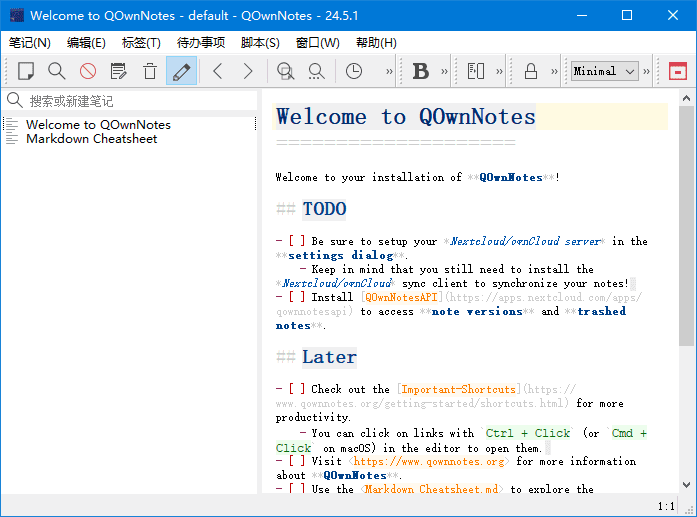
下载地址
Markdown笔记本软件 QOwnNotes v26.4.22 中文绿色版
- 夸克:https://pan.quark.cn/s/a71809917f55
- 百度:https://pan.baidu.com/s/1DIVX0bXTOkQqm6wflZSckw?pwd=88in
- 迅雷:https://pan.xunlei.com/s/VOi157XPZZzuTNKtCqcHmQ4LA1?pwd=7wx5#
核心功能
- 1.支持多种编辑器:支持Markdown、Html、和其它多种文本编辑器;
- 2.易于搜索:可设置快捷键进行搜索,支持正则表达式搜索;
- 3.多个账户:可以管理多个账户,并可以自定义设置;
- 4.可定义笔记标签:可以使用标签来组织笔记,方便查找;
- 5.全文搜索:支持全文搜索,可以在整个笔记库中搜索文本;
- 6.数据同步:可以通过多种方式进行数据同步,包括Dropbox、Nextcloud等;
- 7.导出功能:可以通过PDF、HTML等格式导出笔记。
软件特点
- 跨平台无缝兼容完美支持 Windows、Mac、Linux 三大操作系统,笔记与配置可跨设备同步,在不同系统上保持一致的使用体验,适合多设备办公用户。
- 开源免费隐私优先基于开源协议开发,无订阅费用、无广告植入;笔记数据默认存储在本地,云同步需手动开启,用户可完全掌控自己的数据,避免隐私泄露风险。
- 轻量化低资源占用软件体积仅 36.5MB,启动速度快,运行时占用内存与 CPU 资源极少,即使长期后台运行也不会拖累系统性能。
- 人性化细节优化v25.12.6 版本优化了收藏图标对比度,为浅色与深色模式分别适配本地图标,视觉体验更舒适;自动记忆笔记编辑状态,再次打开时恢复上次的编辑位置。
中文切换
按照此步骤 note > settings > interface > 简化字 > 设置,重启软件,即可完成修改。
更新日志
QOwnNotes – Version History
https://github.com/pbek/QOwnNotes/releases/
26.4.22
The Shortcuts settings action name tree now shows the full menu hierarchy,
with submenus rendered as nested tree nodes so all levels of the menu structure
are visible (for #3583)
Added a new Note text edit submenu to the Edit main menu that exposes
all note text edit context menu actions (link, block quote, list operations,
Markdown operations, search text on web, find note, copy code block) so they
can be reached from the menu bar and have shortcuts assigned in the
Shortcuts settings; the submenu is only enabled when the note edit panel
is visible (for #3582)
Added more French, Spanish, Korean translation (thank you, jd-develop,
AlejandroMoc, VenusGirl)
关键词
QOwnNotes, 开源笔记,Markdown 笔记,跨平台笔记,Nextcloud 同步,便携版,中文笔记,版本恢复