
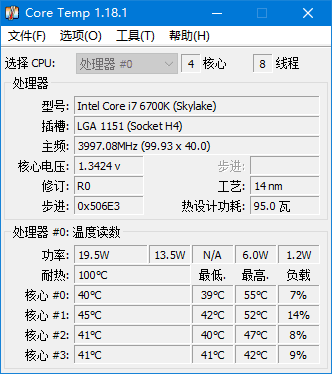
Core Temp是一款免费的硬件监测软件,主要用于监测和显示计算机CPU温度和相关信息。它能精准读取 Intel、AMD 等主流处理器的内核温度,支持单核心独立监控,提供温度颜色警报(橙色 = 高温、红色 = 临界)、自定义阈值提醒及 CSV 格式温度日志记录。

下载地址
监测和显示CPU温度 Core Temp v1.20 多语便携版
软件功能
- 监测CPU温度:Core Temp能够准确地测量每个CPU核心的温度,并通过实时显示界面呈现出来。
- 提供CPU信息:用户可以获得处理器的详细信息,如型号、频率、电压等。
- 温度报告:软件提供完整的报告,包括温度变化曲线图和历史记录,帮助用户监测和分析CPU温度趋势。
- 自定义警报:用户可以设置CPU温度警报功能,当温度达到用户预设的阈值时,软件会提醒用户采取相应措施。
- 软件更新和支持:Core Temp团队会经常更新软件,以确保其与最新的处理器兼容,并提供技术支持。
软件特点
- 精准度高:Core Temp通过读取处理器内置的温度传感器来获取准确的温度数据。
- 界面简洁直观:软件的界面清晰简洁,以图形方式显示温度和其他信息,易于使用和理解。
- 资源占用低:Core Temp是一款轻量级软件,占用的系统资源很少,对计算机性能影响较小。
- 兼容性好:该软件支持多种处理器型号和制造商,覆盖了大部分常见的处理器。
- 免费使用:Core Temp是一款免费软件,所有功能都可以免费使用,不需要付费。
更新日志
Core Temp - Version History
https://www.alcpu.com/CoreTemp/history.html
Version 1.20 - 4th April, 2026
- Add new notification tray configuration. It now allows you to show/hide any of the sensors that are available. This change means that existing color configs will be reset.
- Add a battery status indicator for the notification area.
- Add updated Mini-Mode.
- Add zoom setting for the main UI (in Options --> Settings --> Display)
- Add show Processor model name in a tool-tip when the name is too long to fit in the model field.
- Fix incorrect readings or missing readings or incorrectly mapped CPUs/cores on some Intel platforms.
- Fix driver security vulnerability.
- Fix BSOD on machines with Kernel-mode Hardware-enforced Stack Protection enabled.
- Fix BCLK detection on some Intel gen 10 and 11 systems.
- Fix BCLK detection in some situations on AMD K8 chips.
- Fix core temperature detection on some AMD Matisse, Rembrandt and Strix APUs.
- Fix TjMax for some Zen1 CPUs
- Fix Min/Max/Avg fields not recording changes while the Core Temp window is minimized
- Fix platform detection of LGA 2066 Kaby Lake processors.
- Fix temperature reporting on AMD AM2 CPUs (G-revision)
- Fix some AMD K8 (G-revision) CPU not detected on startup message
- Fix model name detection for K8 through K14 generations
- Fix Core Temp randomly crashing (caused by 3rd party SW)
- Fix Core Temp crash on start on some AMD Ryzens with a single CCD.
- Fix Core Temp starting at the wrong window position in certain situations.
- Change G15 applet to support displaying more than 8 temperatures, use the 3rd button to scroll to the next set of temps. And fix spacing for a less twitchy UI.
- Change ini file to correctly save each setting under its section (this may lead to some settings being reset to defaults)
关键字
Core Temp, CPU 温度监测,硬件检测工具,处理器温度监控,轻量监测软件,温度警报,CPU 信息查看,便携版
原创文章,作者:店小二,如若转载,请注明出处:https://www.4mf.top/36322.html
